Mileage · Android Automotive
Logbook
Classify each trip as business, personal, or deductible — with the kilometres allocated as you drive. Clean mileage records for the office, without the spreadsheet.
What it does
The mileage log that fills itself in.
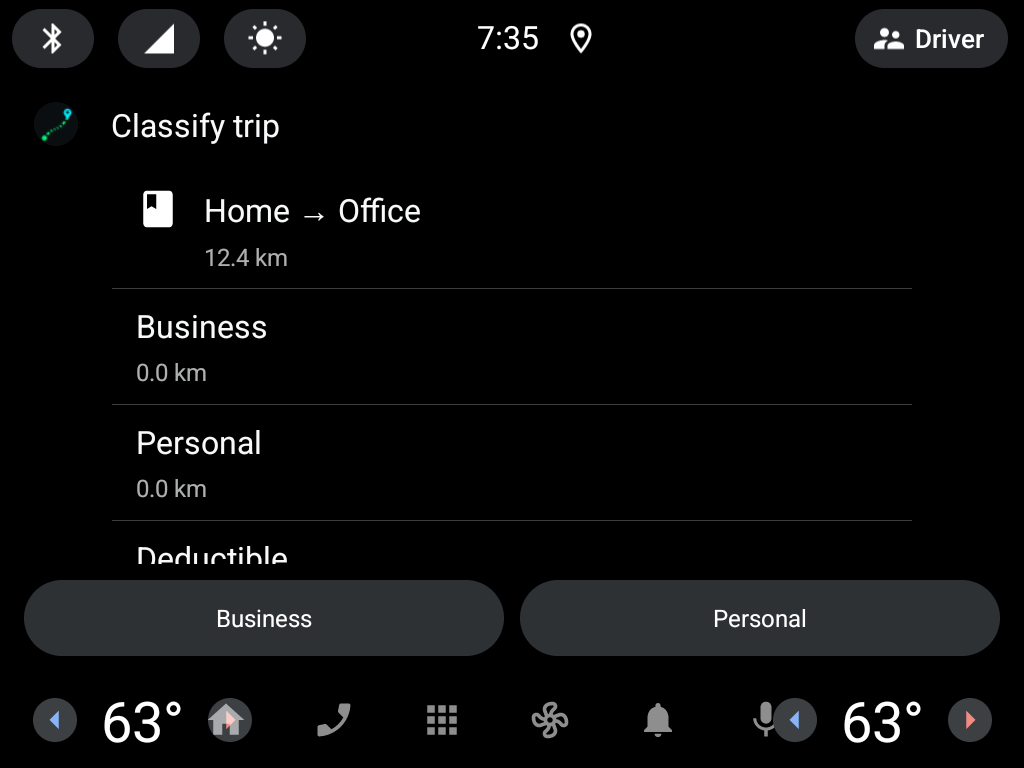
Reconstructing a month of trips from memory and receipts is the part nobody wants. Logbook captures each trip as it happens — for example a Home → Office drive of 12.4 km — and lets you classify it in one tap.
Mark it business, personal, or deductible, and the kilometres are allocated to the right bucket automatically. At month-end you have a clean, defensible record instead of a shoebox of notes.
The screens
One tap per trip.

Under the hood
The technical angle.
- Platform
- Android Automotive (AAOS), built on the Car App Library with distractionOptimized UI.
- Capture
- Trip start and end, route, and distance are logged automatically; the driver only makes the one classification decision.
- Output
- A per-period mileage record split into business, personal, and deductible, ready for the office or the tax filing.
- Who it’s for
- Fleet managers, sales and field teams, and businesses that need clean, defensible mileage records without a spreadsheet.
Give your fleet a clean mileage record.
We build Logbook from scratch, or adapt the categories and export to your accounting or fleet system. Tell us what you’re running.